Coffee machine parts and care products›Miele›CVA 7845 DirectWater
Miele CVA 7845 DirectWater
Find 7 manufacturer-confirmed parts and accessories for Miele CVA 7845, with exact model codes, regions and official evidence. Reference: MB-CVA 7000, GP DC CX 0061 T.
Confirmed parts for Miele CVA 7845 DirectWater: MB-CVA 7000, GP DC CX 0061 T, GP CL CX 0102 T, GP DC 102 C, CoffeeCare Set, GP CC 001 C, GP CL MCX 1001 P. Each match keeps its model details, applicable regions and source.
Buying options appear beside the matching part when they are available.
Model number
CVA 7845
Category
Coffee machine parts and care products
Reference
MB-CVA 7000 · GP DC CX 0061 T · GP CL CX 0102 T · GP DC 102 C · CoffeeCare Set · GP CC 001 C · GP CL MCX 1001 P
Compatibility regions
FR, EU, UK
Last checked
29 August 2026
Category illustration
MB-CVA 7000Genuine part
✓
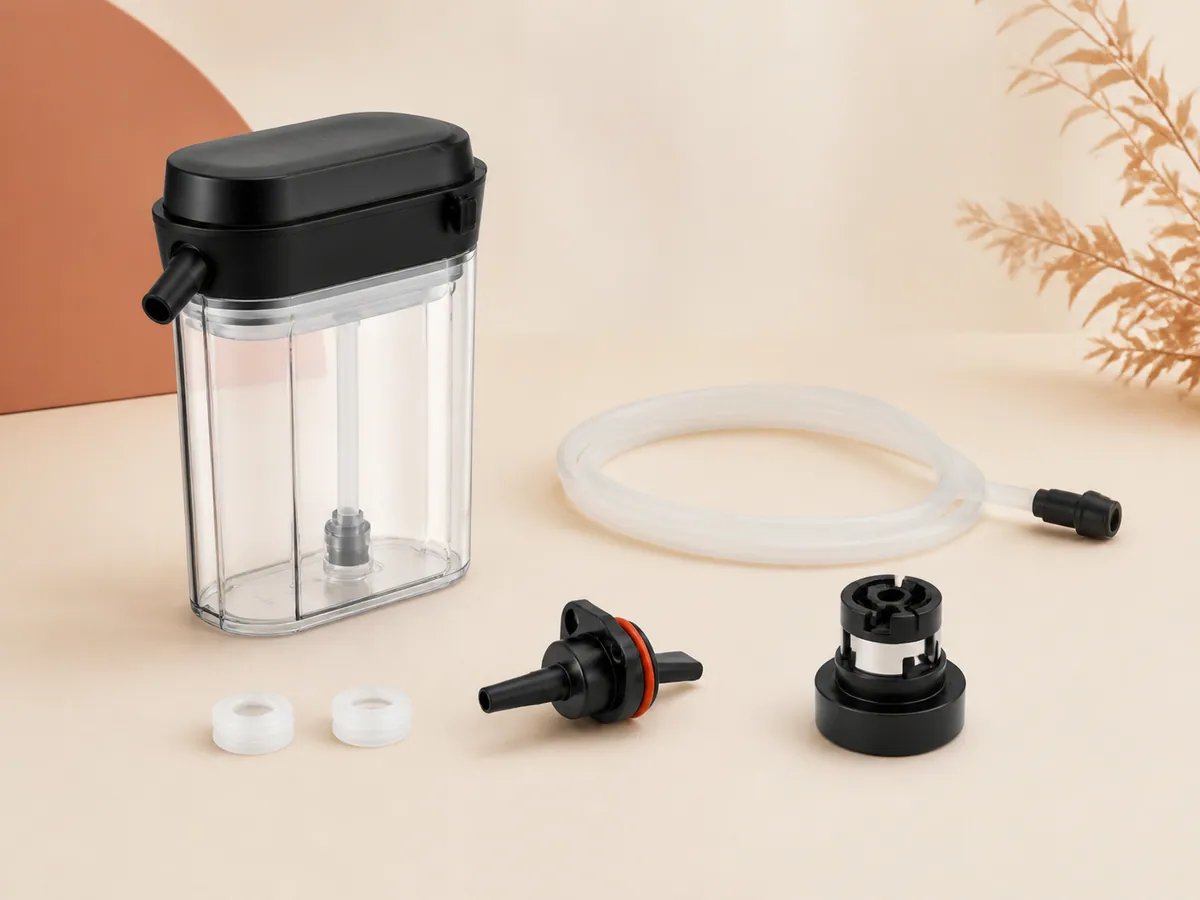
Miele CVA 7000 milk container
Miele official cva 7000 milk container, reference MB-CVA 7000. Compatibility is published only for the exact appliance codes explicitly listed by the manufacturer source.
Miele official six descaling tablets, reference GP DC CX 0061 T. Compatibility is published only for the exact appliance codes explicitly listed by the manufacturer source.
Miele official ten cleaning tablets, reference GP CL CX 0102 T. Compatibility is published only for the exact appliance codes explicitly listed by the manufacturer source.
Miele official autodescale cartridge, reference GP DC 102 C. Compatibility is published only for the exact appliance codes explicitly listed by the manufacturer source.
Miele official coffeecare maintenance set, reference CoffeeCare Set. Compatibility is published only for the exact appliance codes explicitly listed by the manufacturer source.
Miele official autocleaner cartridge, reference GP CC 001 C. Compatibility is published only for the exact appliance codes explicitly listed by the manufacturer source.
Miele official milk-system cleaner, reference GP CL MCX 1001 P. Compatibility is published only for the exact appliance codes explicitly listed by the manufacturer source.
Parts for Miele CVA 7845 DirectWater: references and compatibility
Which parts fit Miele CVA 7845 DirectWater?
7 documented parts are currently linked to this exact appliance. The covered families are Bins & tanks, Care products; the verified references are MB-CVA 7000, GP DC CX 0061 T, GP CL CX 0102 T, GP DC 102 C, CoffeeCare Set, GP CC 001 C, GP CL MCX 1001 P.
How do I verify the CVA 7845 model before ordering?
Read the complete code on the rating label, including every suffix, then compare the documented regions (FR, EU, UK) and the reference printed on the part.
Why this part fits
Miele CVA 7000 milk container
The official Miele source explicitly links reference MB-CVA 7000 to Miele model code CVA 7845 or to the model-code family listed on this page.
Models covered: CM 7550, CM 7750, CVA 7845, CM 6160, CM 6360 and CM 6560. On Miele CM and CVA coffee machines, “F73 or Check the brew unit” should be checked with the official user procedure before any part is considered.
Models covered: CM 7550, CM 7750, CVA 7845, CM 6160, CM 6360 and CM 6560. On Miele CM and CVA coffee machines, “Fill bean container despite beans” should be checked with the official user procedure before any part is considered.
The tray is empty but Miele still asks you to empty it? Check how removal was registered and how the assembly is seated, using the procedure for your exact CM or CVA model.
Models covered: CM 7550, CM 7750, CVA 7845, CM 6160, CM 6360 and CM 6560. On Miele CM and CVA coffee machines, “no milk or froth from the central spout” should be checked with the official user procedure before any part is considered.
Models covered: CM 7550, CM 7750, CVA 7845 and CM 6560. On Miele CM and CVA coffee machines, “coffee stops and Fill bean container appears” should be checked with the official user procedure before any part is considered.
CVA 7845 DirectWater: F233 means the cup-rim sensor is absent or not seated correctly after cleaning. Switch off, let the spouts cool, refit the clean sensor in the central spout exactly as shown and switch on so it can initialise; if F233 returns, contact Miele.
CVA 7845 DirectWater: These codes ask for the bean-container system to be set up again, not for the grinder to be opened. Follow the display: remove the bean containers when requested, close the door, wait for the drive sequence and reinsert each labelled container in its original position.
CVA 7845 DirectWater: F307 points to residue around the removable milk valve components named in the maintenance procedure. Let the machine cool, remove and clean only the milk-valve cover and silicone components shown in the manual, refit them dry and run the milk-pipework rinse.
CVA 7845 DirectWater: A maintenance programme cannot continue because the filled water container has not reached its end stop. Fill only to the maintenance marker requested on screen, wipe the valve area, place the container squarely on its guides and push until it audibly engages; do not defeat the sensor.
CVA 7845 DirectWater: A clean dry display that ignores every touch is different from a dark display or a menu item disabled by a running programme. Dry the screen, remove gloves, wait for the current cycle to end and try one normal touch. If all sensors remain inactive, isolate power at the approved disconnect and call Miele.
CVA 7845 DirectWater: The CVA can ventilate after the display switches off to remove internal moisture; brief continued running is normal dehumidification. Leave the ventilation openings clear and allow the fan to stop by itself.
CVA 7845 DirectWater: Without F73, the drive may simply not be parked in the removal position; this is a different intent from the F73 fault page. Close the service door with the brew unit in place, switch the machine on and off normally once and wait for all movement to stop before trying the release again; never lever it out.
CVA 7845 DirectWater: A very wide cup can sit outside the cup-rim sensor’s detection area, so automatic spout positioning cancels the drink. Remove the wide vessel, use a narrower cup centred below both spouts and repeat once. Do not hold the sensor or spout down by hand during automatic movement.
CVA 7845 DirectWater: Cup temperature, selected brewing temperature and a restricted brew unit are the manual’s user-checkable causes before a heating fault is assumed. Preheat the cup, select a higher permitted brewing temperature and clean the brew unit through the documented programme; compare one identical black coffee… Preserve the exact words, code, timing and drink before changing anything: a similar symptom can have a different cause.
CVA 7845 DirectWater: A flow that is too quick points first to coffee ground too coarsely, not to a stronger pump. Move the grinder only one step finer while it is operating as the manual instructs, keep drink quantity and beans unchanged and judge the second following drink.
CVA 7845 DirectWater: A restricted brew unit or overly fine grind can slow coffee even when hot water still flows normally. Run the degreasing programme when requested, rinse the removable brew unit and compare one drink before moving the grinder one step coarser while it runs.
CVA 7845 DirectWater: Large or oily beans can stick above the outlet so the grinder receives too few beans even though the container looks full. Switch off, remove the bean container as the manual permits, clean it dry and refill with dry roast; never push an object or fingers into the grinder opening.
CVA 7845 DirectWater: Coffee-oil deposits in the removable central spout can divide the flow unevenly; this is not the same as no milk foam. Let the spout cool, remove only the central-spout parts shown in the manual, clean every coffee channel and refit them before running a rinse without coffee.
CVA 7845 DirectWater: Air entering through deposits or a poorly seated milk path can make milk spit rather than form a steady stream. Stop the milk drink, let the spout cool, dismantle and clean only the removable milk paths and refit every seal and tube fully before one cold-milk test.
CVA 7845 DirectWater: Auto maintenance waits for the documented readiness conditions, including fitted containers, sufficient water and no drink preparation in progress. Finish the current operation, fill and engage the water container, empty and refit the drip-tray assembly and close the door; leave the machine connected for… Preserve the exact words, code, timing and drink before changing anything: a similar symptom can have a different cause.